
Printer Alignment Test
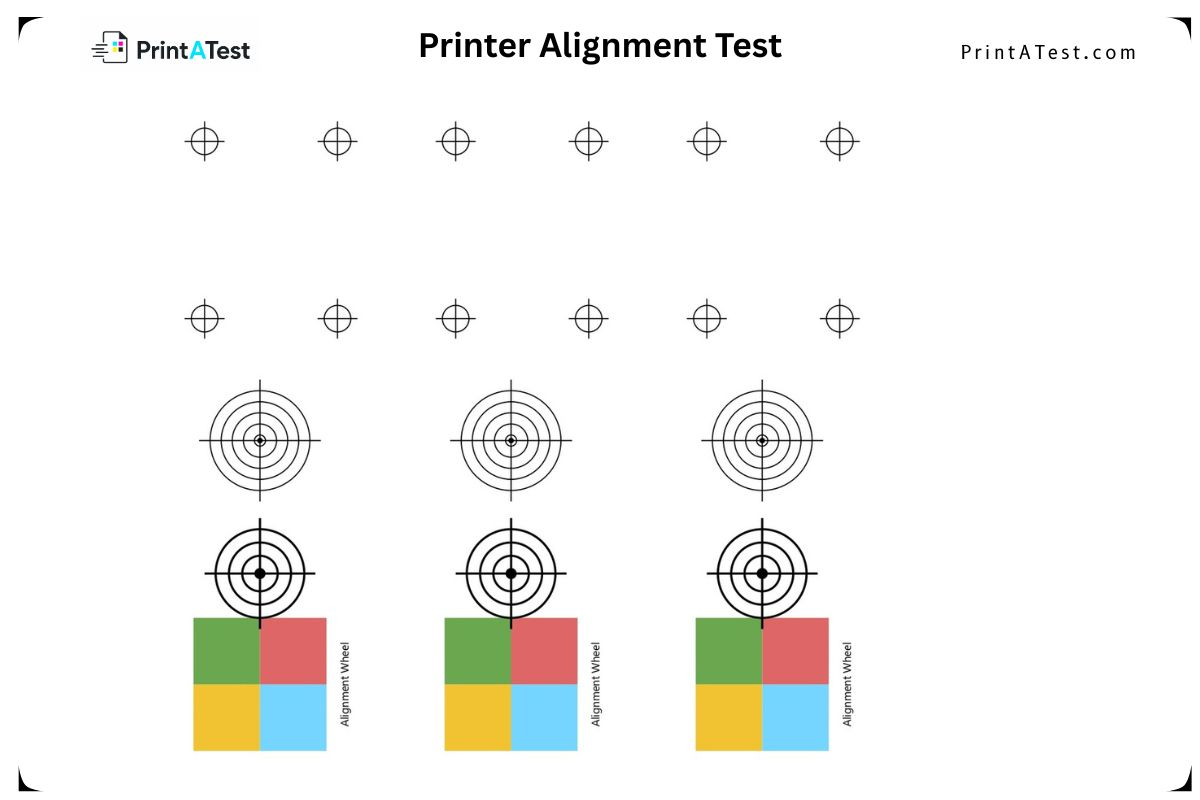
Registration marks, crosshair targets, and an alignment wheel for diagnosing print head alignment, skew, and paper feed accuracy.
About This Printer Alignment Test
This printer test page provides a professional diagnostic tool to help you quickly identify printer issues. Whether you're troubleshooting a home inkjet or a commercial laser printer, running this test regularly keeps your prints crisp and consistent.
Use it to spot clogged nozzles, alignment problems, weak toner, and color-cast issues before they show up in important documents.
How to Use the Printer Alignment Test Page
- 1Print the Test PageClick the “Print This Test Page” button and print on high-quality paper. Ensure your printer is set to its highest resolution for accurate reproduction.
- 2Check Primary Colors and Solid BlocksExamine each color block to ensure pure, vibrant colors without shifts or tinting. Look for consistent solid coverage without streaks or gaps.
- 3Verify Gradients and Color ScalesCheck that all percentage steps are visible and distinct. Look for smooth gradients without banding or sudden jumps.
- 4Inspect Registration Marks and AlignmentExamine the corner registration marks to ensure proper alignment between different color layers. Misaligned marks indicate registration issues.
- 5Assess Text and Fine DetailCheck the sharpness and clarity of text elements and percentage labels. Look for crisp edges without color bleeding or blurring.

Why Use Our Printer Alignment Test
Ensure Accurate Color Calibration
Industry-standard test patterns help you calibrate your printer for consistent reproduction across all print jobs.
Detect Banding, Misalignment & Ink Issues
Comprehensive patterns reveal common printing issues like banding, registration misalignment, and clogged nozzles before they affect important documents.
Works with Laser and Inkjet Printers
Reliable diagnostics for commercial and home printing environments with precise evaluation tools.
Frequently Asked Questions (FAQ)
Printer Alignment Test — printatest.com
Measure the distance between the corner registration marks — they should be identical on all four sides. Misaligned crosshairs indicate print head calibration issues.